
Modern CSN operations for maritime compliance.
SWAY CSN turns Sea Cargo Summary Notification filing into a guided, checkable workflow — from master and house cargo declarations through to a digitally signed, ICEGATE-format file.
Purpose-built for shipping lines, consolidators, freight forwarders and custodians filing under SCMTR. Structured masters, built-in validation, and a review checklist before anything is submitted.
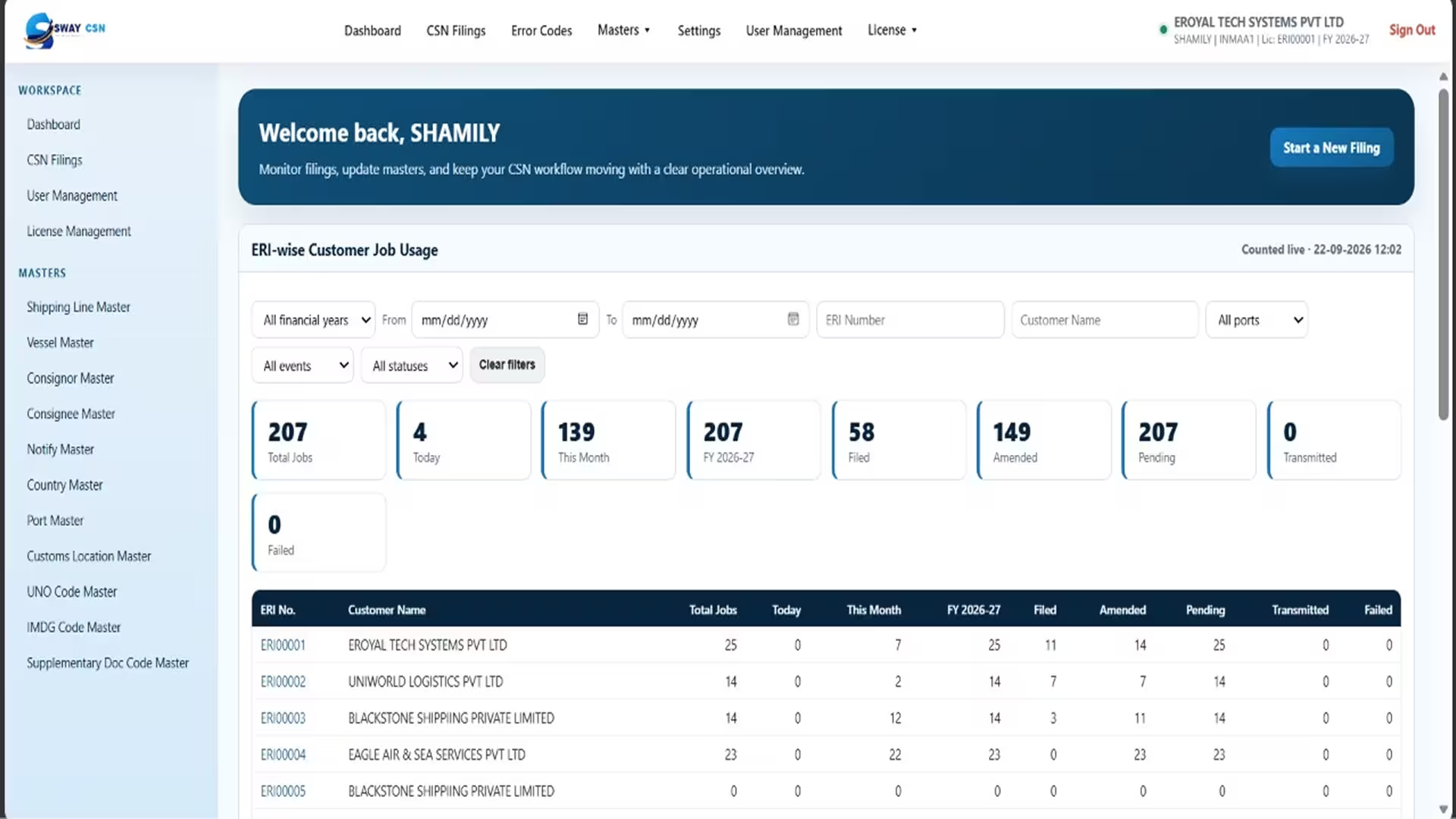
A single secure workspace for the whole SCMTR filing cycle.
Sea Cargo Manifest and Transhipment Regulations require a Sea Cargo Summary Notification to be filed for every consignment — accurately, on time, and in ICEGATE's exact format. Doing that in spreadsheets means re-typing the same consignor, vessel and port details on every job, and finding mistakes only when ICEGATE rejects the file. SWAY CSN replaces that with a guided workspace. Reference data is captured once as masters and reused on every filing. Master and house cargo declarations are entered in a structured form that knows what SCMTR expects. The filing is reconciled and reviewed against a printable checklist, then produced as an ICEGATE-format JSON file and signed with your DSC token — all before it ever leaves your desk.
Capture the filing
Check and file
Secure and in control
On the roadmap
Guided declaration entry
Master Consignment Declarations with their House Cargo Declarations nested underneath, each with location, transhipper, transport document, parties, measures, items, equipment and itinerary.
- Master Consignment Declarations
- House Cargo Declarations
Capture the filing
Master Consignment Declarations with their House Cargo Declarations nested underneath, each with location, transhipper, transport document, parties, measures, items, equipment and itinerary.
- Master Consignment Declarations
- House Cargo Declarations
Vessel, Shipping Line, Consignor, Consignee, Notify Party, Port, Customs Location, Country, UNO, IMDG and Supplementary Document codes — entered once, reused everywhere.
- Entered once
- Reused everywhere
Download a format for any section, fill it in, upload it back. Rows that fail validation are listed with the exact column and reason, so a partial import is never a silent one.
- Excel formats
- Exact column and reason
- No silent partial imports
Already have an ICEGATE-format JSON? Upload it and continue working on it as a job, with a summary of what was created and anything that needed attention.
- ICEGATE-format JSON
- Continue as a job
Check and file
Packages and gross weight on the master are checked against the total of its house declarations, and the mismatch is shown as you work — not after ICEGATE rejects the filing.
- Packages
- Gross weight
A complete, printable checklist of every value on the filing — header, vessel and voyage, each consignment, parties, items and equipment — for review or sign-off before submission.
- Printable
- Review or sign-off
Sign the filing with your USB DSC token directly from the browser, via a small one-time helper that installs on the PC. No separate desktop signing tool to open.
- USB DSC token
- Sign from the browser
- One-time helper install
Reopen a filed job to amend it, or duplicate an existing one to start a new filing from data you have already captured, with a fresh job number.
- Amend
- Duplicate
- Fresh job number
A searchable list of ICEGATE's own error codes and their meanings, so a rejection message can be understood without leaving the application.
- Searchable
- ICEGATE error codes
Secure and in control
Users are scoped to the customs locations their company is authorised for, and the Port of Reporting is locked to the branch they signed in under — enforced on the server, not just in the form.
- Customs location scoping
- Locked Port of Reporting
- Enforced on the server
Install SWAY CSN to the desktop from the browser and open it like any other application, with no download or client software to maintain.
- Install from the browser
- No client software
Every company's filings live in their own database, and ICEGATE credentials are encrypted before they are stored. Jobs belong to exactly one company — never shared.
- Own database per company
- Encrypted ICEGATE credentials
On the roadmap
Filing today produces a signed, ICEGATE-format file that you submit through the ICEGATE portal. Direct submission and automatic acknowledgement retrieval are in development.
- On the roadmap
Built for Businesses That File
Under SCMTR
SWAY CSN is a filing workspace for the Sea Cargo Manifest and Transhipment Regulations. Shipping lines, consolidators and forwarders use it to capture master and house cargo declarations against reusable masters, reconcile packages and weights, review a complete checklist, and produce a digitally signed ICEGATE-format file — all from one secure application.

From masters to a signed filing, in four steps.
Every filing is built, checked and signed in one workspace.
- 01
Set up your masters
Capture vessels, parties, ports and customs locations once. Import them in bulk from Excel if you already hold them elsewhere.
- 02
Build the filing
Create a job, add each Master Consignment Declaration and its House Cargo Declarations. Pull repeated details from the master consignment instead of retyping them.
- 03
Check it before it goes
Run the checklist. Packages and weights are reconciled, mandatory fields are validated, and the whole filing can be reviewed on paper or on screen.
- 04
Sign and file
Produce the ICEGATE-format JSON, sign it with your DSC token, and submit. Amend the job later and file again whenever details change.
TRUSTED BY LEADING LOGISTICS COMPANIES




















Why teams choose it
Mistakes surface early.
Reconciliation and field validation happen while you work, not after a rejection.
- Reconciliation
- Field validation
Nothing is typed twice.
Masters, "fetch from master consignment", and job duplication remove the repetition that causes errors.
- Masters
- Fetch from master consignment
- Job duplication
Every filing is reviewable.
The checklist gives a complete record of what was filed, ready to print or archive.
- Archive
Signing stays on your desk.
Your DSC token never leaves the PC; the browser talks to it through a local helper.
- DSC stays on the PC
- Local helper
Set up in minutes.
Nothing to install for day-to-day use — sign in and file.
- Nothing to install
What you need to get started
A modern browser
Chrome, Edge or Firefox. Optionally install SWAY CSN to the desktop.
- Chrome
- Edge
- Firefox
Your ICEGATE ID
Configured against your licence and used as the Sender ID on every filing.
- Sender ID
A DSC token
Required only to sign filings. A one-time helper install per PC enables signing from the browser.
- Signing only
User accounts
Created by your administrator, each scoped to the branches and customs locations they may file for.
- Branch scoped
Ready to Simplify SCMTR Filing?
SCMTR Sea Cargo Summary Notification filing, made structured, checkable and signable.