
Every export document, and the money that follows it, on one file.
SWAY Trade takes an export from the proforma to the bank realisation. The order, the packing, the invoice set, the shipping bill, the drawback claim and the remittance all sit together — so the same shipment is never typed twice.
Built in India for exporters, merchant exporters and manufacturers — and for importers, with bills of entry, duty and landed cost on the same system. Nine printed documents from one invoice, letters of credit, drawback and RoDTEP tracking, e-BRC, a portal for your buyers, and working files for GSTR-1 and Tally.
RoDTEP Tracking
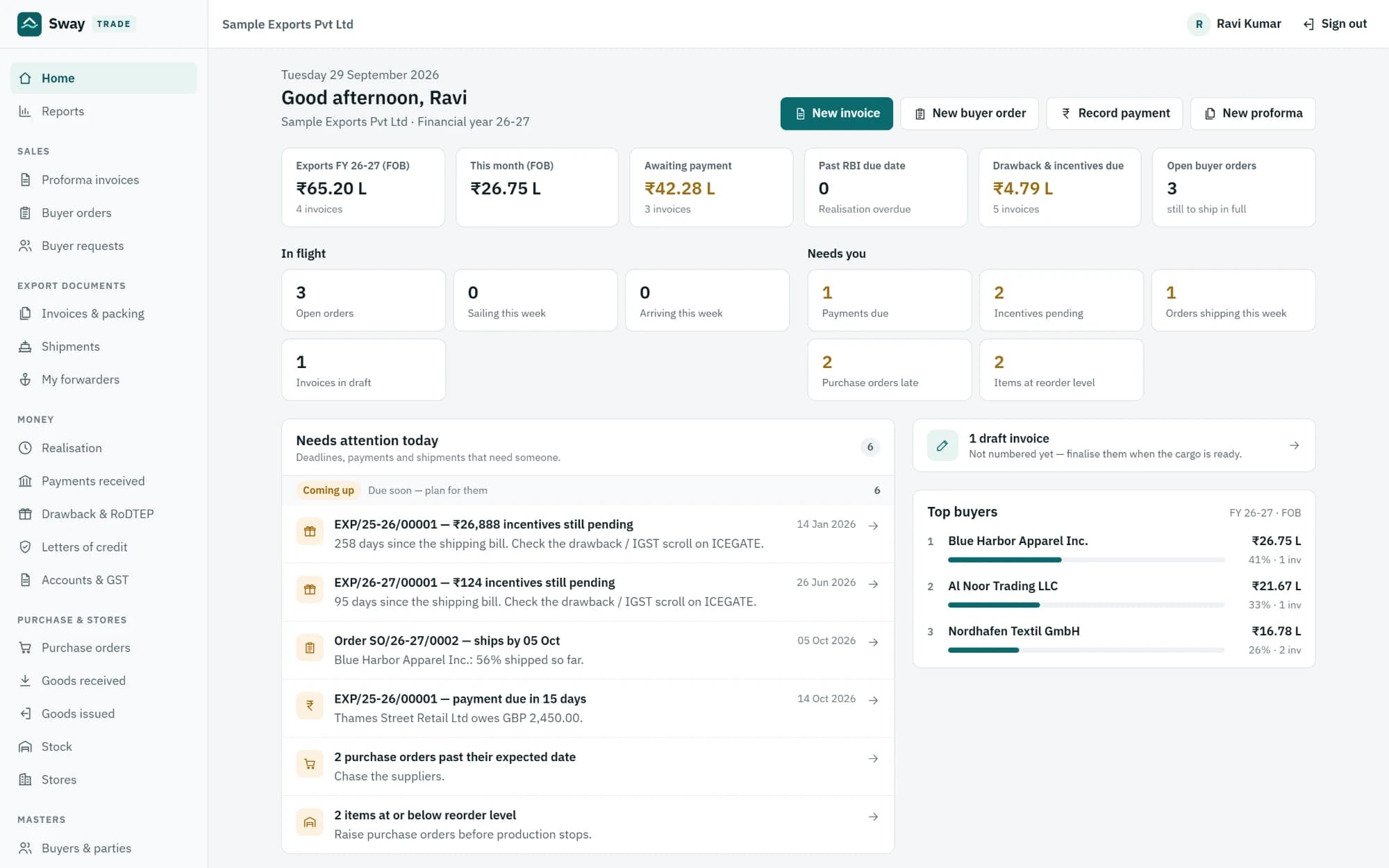
One workspace for export paperwork, orders, shipments and the money.
In most export offices the same invoice is typed three times: once as the commercial invoice, again as the packing list, again for the bank. The shipping bill number arrives by email and is pasted into a spreadsheet. Drawback and RoDTEP are tracked on a separate sheet that only one person maintains. Nobody is certain which invoices are still waiting for money until the banker asks. SWAY Trade holds buyers, suppliers, items, ports and customs exchange rates once, as masters. A proforma becomes a buyer's order, and the order becomes an export invoice with its packing list generated from the item's own packing. Finalising the invoice checks the things that stop a consignment — the LUT, the letter of credit, the stock — and gives it its number. From that one record the whole document set prints. The shipping bill, LEO, bill of lading and vessel go back onto the same invoice, the remittance is matched against it, and the drawback and RoDTEP expected against it are compared with what actually arrived.
Documents
Order to shipment
Money and incentives
Stock and imports
Buyers and compliance
Nine documents from one invoice
Commercial invoice, packing list, GST invoice, shipping instructions, bill of exchange, shipment advice, certificate of origin, export value declaration, and a customs invoice in the Canada CI1 format that US brokers accept — all printed from one record, on one A4 sheet each. Change the invoice and every document changes with it.
- Nine documents
- One record
- One A4 sheet each
Documents
Commercial invoice, packing list, GST invoice, shipping instructions, bill of exchange, shipment advice, certificate of origin, export value declaration, and a customs invoice in the Canada CI1 format that US brokers accept — all printed from one record, on one A4 sheet each. Change the invoice and every document changes with it.
- Nine documents
- One record
- One A4 sheet each
Order to shipment
Quote on a proforma, turn it into the buyer's order, and watch each line's shipped and pending quantity as invoices go out against it.
- Proforma
- Buyer's order
- Shipped and pending
Finalising an invoice checks the LUT, the letter of credit's room and the stock on hand. The things that hold a consignment at the port are caught at the desk instead.
- LUT
- Letter of credit
- Stock on hand
Each LC with its tolerance and expiry, and what has been drawn against it, so an invoice that would breach it is refused while it can still be changed.
- Tolerance and expiry
- Drawn so far
Money and incentives
Match remittances to invoices, in part or in full. Each invoice carries its RBI realisation due date, and what is overdue or backed by an e-BRC is visible without a separate sheet.
- Part or full
- RBI due date
- e-BRC
What each shipment should earn is worked out from the item's own rates and recorded when the invoice is finalised. Compare it against what was actually credited, and see what is still owed to you.
- Expected vs credited
- Still owed to you
Stock and imports
Purchase orders, goods received, issues and transfers, on a stock ledger that never goes negative. Exports draw from the same stock, so an invoice cannot ship goods that are not there.
- Stock ledger
- Never negative
Orders to overseas suppliers; an import shipment carrying several bills of entry, each with the duty actually paid and its out-of-charge date; clearing charges; and the landed cost per unit, with IGST kept out because it is creditable. Goods are received into stock at that landed cost.
- Bills of entry
- Landed cost per unit
Buyers and compliance
Your buyers sign in at your own address and see their orders, how each shipment is progressing, their four documents, and what they have paid. They can send you requests and quotes, which land in your sales screen.
- Orders and progress
- Documents
- Payments
A GSTR-1 table 6A working sheet by month, rate-wise, with the port and shipping bill, and a plain list of what the portal would refuse. The GST e-invoice JSON in its export flavour. Tally vouchers for a date range as importable XML, covering sales, money in, purchases and money out. Nothing is filed or sent anywhere — these are files you check and upload yourself.
- GSTR-1 table 6A
- e-invoice JSON
- Tally XML
Built for Businesses That Move
Exports Faster
SWAY Trade is export documentation software built in India for exporters, merchant exporters and manufacturers. One export invoice produces the whole document set — the commercial invoice, packing list, certificate of origin, bill of exchange and the rest — and carries its shipping bill, letter of credit, drawback and RoDTEP with it. Remittances are matched to invoices with their RBI due dates and e-BRCs, importers get bills of entry and landed cost on the same system, and buyers track their own orders and documents through a portal. It runs in one secure application, with each company's records in their own database.

From the buyer's order to the money, in four steps.
Every shipment is quoted, shipped, paid for and claimed in one workspace.
- 01
Set up your company
Add your buyers, suppliers, forwarders, CHAs and banks, then your items with their HS codes, packing and incentive rates. Ports and customs exchange rates are already there. Bring parties and items in from a spreadsheet if you have one.
- 02
Take the order
Send a proforma, and turn it into the buyer's order when it is confirmed. Record the letter of credit, if there is one, with its tolerance and expiry.
- 03
Ship it
Raise the export invoice against the order. The packing list fills itself in. Finalise it — the LUT, the LC and the stock are checked — then print or email the whole document set, and add the shipping bill, LEO and bill of lading as they come back.
- 04
Get paid, and claim what you are owed
Match the remittance to the invoice and record the e-BRC. Drawback, RoDTEP and IGST refund expected against that shipment sit beside what was actually credited, so anything missing is visible rather than remembered.
TRUSTED BY LEADING LOGISTICS COMPANIES





















Why teams choose it
One invoice, the whole document set.
The commercial invoice, packing list, certificate of origin, bill of exchange and the rest all come from the same record, so they cannot disagree with each other.
- One record
- Nine documents
The problems are caught at the desk.
The LUT, the letter of credit's room and the stock are checked when the invoice is finalised — not at the port, and not by the bank.
- LUT
- Letter of credit
- Stock
Incentives are tracked, not remembered.
What each shipment should earn in drawback, RoDTEP and IGST refund is recorded when it ships, and compared with what actually arrived.
- Drawback
- RoDTEP
- IGST refund
The bank's questions are already answered.
Realisation due dates, part remittances, write-offs and e-BRCs sit on the invoices they belong to.
- RBI due date
- e-BRC
Buyers serve themselves.
Orders, progress, documents and payments are in the portal, so your office spends less time sending copies.
- Buyer portal
Nothing is typed twice.
Masters, proforma-to-order and order-to-invoice mean the same buyer, item and packing are never keyed again at the next desk.
- Masters
- Proforma to order
- Order to invoice
What you need to get started
A modern browser
Chrome, Edge or Firefox, on a desktop or a phone.
- Chrome
- Edge
- Firefox
Your sign-in
Your company signs in at trade.eroyal.ai with an email and password. Your buyers use the same address for their portal.
- Email and password
- Buyer portal
User accounts
Created by your administrator. Buyer logins are handed out on the buyer's own record, and hold no office access at all.
- Admin-created
- No office access for buyers
Your masters
Buyers, suppliers and items — from a spreadsheet if you have one. Ports, countries and customs exchange rates come loaded.
- From a spreadsheet
- Ports preloaded
A mailbox
Your own SMTP mailbox, if you want documents to go out from your own address.
- Optional
- Your own SMTP
Ready to Put Every Export on One File?
Export documentation software for Indian exporters: order to invoice to realisation.