
Run your whole forwarding business from one workspace.
SWAY ERP takes every shipment from enquiry to invoice. The quotation, job file, sailing, transport, documents, billing and job profit all sit in one place, for Sea and Air, Export and Import.
Built in India for freight forwarders, NVOCCs, consolidators and transport operators around the world. A nine-stage shipment workflow, multi-currency pricing, invoicing on a double-entry ledger, a portal for your customers, and profit you can see on every job.
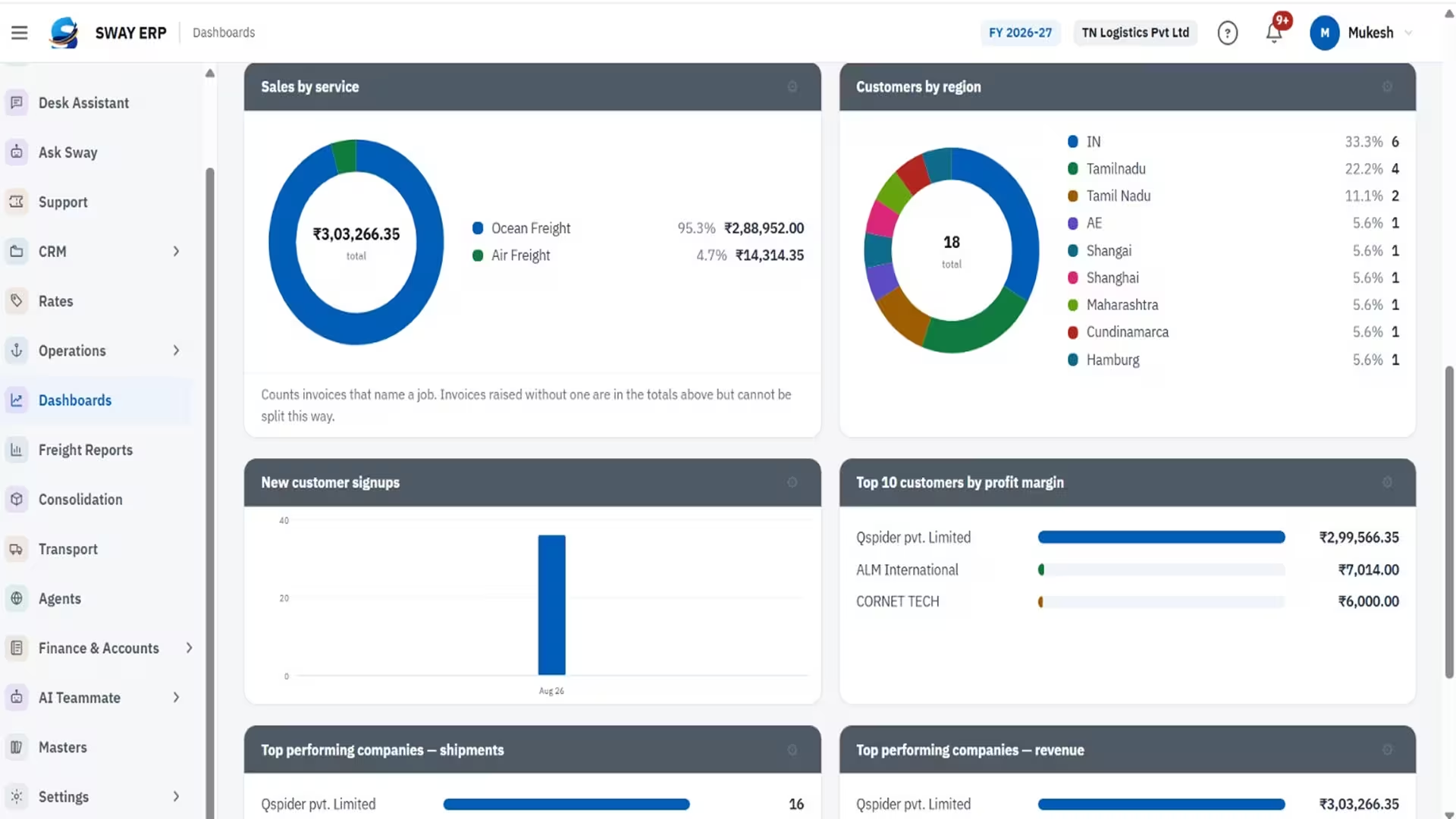
A single secure workspace for the whole shipment lifecycle, from enquiry to final invoice. Built in India, for forwarders anywhere in the world.
In most forwarding offices a shipment is spread across spreadsheets, email threads, WhatsApp groups and a separate accounting package. The same shipper, consignee and vessel get typed again at every desk. Nobody knows what a job made until someone matches its invoices against the vendor bills, weeks after the cargo has sailed. SWAY ERP puts all of it in one application. You capture parties, ports, carriers and rates once, as masters. An enquiry becomes a quotation, and the accepted quotation becomes a job. The job then moves through a nine-stage workflow (booking, transport, customs references, sailing, billing), and every invoice and vendor bill is attached to it. Accounts post to the general ledger as documents are issued, so job profit and the company's books come from the same records.
Win the business
Run the shipment
Bill and see the profit
Work together
Secure and in control
Customs filing
Built for global trade
Price each charge line in any currency from your currencies master. It converts to your base currency at exchange rates refreshed every working day, so a quote in USD, EUR and your local currency still shows one true margin. Around 155 countries and the major seaports and airports worldwide come preloaded.
- Any currency
- Daily exchange rates
- 155 countries preloaded
Win the business
Price each charge line in any currency from your currencies master. It converts to your base currency at exchange rates refreshed every working day, so a quote in USD, EUR and your local currency still shows one true margin. Around 155 countries and the major seaports and airports worldwide come preloaded.
- Any currency
- Daily exchange rates
- 155 countries preloaded
Leads, enquiries with follow-ups and a pipeline board, and quotations with buy and sell on every charge line and a live margin. An accepted quotation becomes a job in one step.
- Pipeline board
- Buy and sell per charge line
- Live margin
Send a lane out to overseas agents by email, or fetch live rates from major carriers through your own carrier sign-ins. You can compare carriers side by side and quote the customer from the offer you pick.
- Agent requests by email
- Live carrier rates
- Side-by-side comparison
Run the shipment
Four lane desks run on one job engine: containers, VGM, CRO and booking, LEO, IGM, BOE and DO for sea, and airports, AWB, flight and chargeable weight for air.
- Four lane desks
- One job engine
- Sea and air documents
Every shipment follows a numbered stepper from enquiry through to billing and P&L. Each stage completes itself from the records behind it, so nobody has to tick a box by hand.
- Nine numbered stages
- Enquiry to P&L
- Stages complete themselves
Enter a vessel, its voyage and its SI, CY and document cut-offs once. When you edit the sailing, every shipment on it that hasn't arrived yet is updated, and a rolled shipment raises an alert.
- SI, CY and document cut-offs
- Edit once, update all
- Rolled-shipment alerts
SI, house B/L and air waybills are printed straight from the job. The customer has to approve the SI and house B/L drafts before they are filed or issued. If the document changes after approval, it needs approving again.
- SI, house B/L and AWB
- Customer approval
- Re-approval on change
Attach house shipments to a consol box and bill the box once. The cost is split across the houses by weight or measure, so each house carries its fair share.
- Consol box
- Bill once
- Split by weight or measure
Trips, vehicles and drivers. From their phone, drivers update the trip status and log fuel, toll and other expenses with a photo of the receipt. The manager then posts those expenses to the job as cost.
- Driver phone app
- Receipt photos
- Expenses posted to the job
Bill and see the profit
Invoices, receipts, vendor bills and payments, all posted to a double-entry ledger with chart of accounts, journal, trial balance, P&L and balance sheet by financial year. For India, GST is worked out from the place of supply.
- Double-entry ledger
- Trial balance, P&L, balance sheet
- GST by place of supply
Invoices and vendor bills are raised from the job file and stay attached to it. That means job profit, and profit by customer or by service, comes from what was actually billed, not from an estimate.
- Job profit
- By customer or service
- From actual billing
Management, Sales, Operations and Accounts dashboards, plus 33 ready-made reports covering accounting, statistics, operations, quotes and CRM. Every report can be filtered by period and exported to CSV.
- Four dashboards
- 33 ready-made reports
- CSV export
Work together
Your customers sign in at your address. They can track their shipments, download documents, approve quotations and drafts, raise bookings and rate requests, and print their own tax invoices.
- Tracking
- Documents
- Approvals
- Tax invoices
An in-app bell and push alerts to phone or desktop. Each job has its own message thread, which can be internal or shared with the customer. Tasks and exceptions go to named people and show up in My Tasks.
- Push alerts
- Job threads
- My Tasks
Quotations, invoices and notifications go out from your own Microsoft 365 or SMTP mailbox once a test send passes. Reminder emails for pending approvals and overdue invoices are available, and stay off until you switch them on.
- Microsoft 365 or SMTP
- Optional reminders
Ask questions about your own data and get a daily briefing. Sway can draft enquiries, quotations, invoices and job updates, and read shipping documents into the job file. Nothing is saved until a person confirms it.
- Optional module
- Daily briefing
- Nothing saved without confirmation
Secure and in control
Branches, users, and custom roles with defined responsibilities. Two-factor sign-in works with an authenticator app, and an audit trail records who changed what.
- Custom roles
- Two-factor sign-in
- Audit trail
Install SWAY ERP from the browser on a desktop or phone and open it like any other app, with push notifications. There's no download and no client software to maintain.
- Desktop or phone
- Push notifications
Every forwarder's records live in their own database, which is backed up every night. Mailbox, carrier and AI credentials are encrypted before they are stored.
- Own database
- Nightly backups
- Encrypted credentials
Customs filing
The job file holds the customs references your broker sends back (for India, the Shipping Bill, Bill of Entry and LEO, along with SCOMET screening). India's SCMTR filing is handled by SWAY CSN, a sister product.
- Customs references on the job
- SCMTR via SWAY CSN
Built for Businesses That Drive
Freight Forwarding
SWAY ERP is a freight forwarding ERP built in India for forwarders, NVOCCs and consolidators around the world. Teams use it to take every Sea and Air shipment from enquiry and multi-currency quotation through booking, transport and documents to invoicing. Every invoice and vendor bill is attached to its job, and the books post to a double-entry ledger. Customers track shipments, approve drafts and print their invoices through their own portal. It all runs in one secure application.

From setup to profit, in four steps.
Every job lives on one file, from the first enquiry to the final invoice.
- 01
Set up your company
Add branches, users and roles, then your customers, agents, carriers and vendors. Countries, currencies, seaports and airports worldwide are already loaded.
- 02
Win the business
Log the enquiry, price it from your rates or a carrier request, and send the quotation. The customer can approve it online.
- 03
Run the shipment
The accepted quotation becomes a job. Book it, attach the sailing, arrange transport and share drafts for approval. The job moves through all nine stages on one file.
- 04
Bill it and see the profit
Raise invoices and book vendor bills against the job. The ledger posts itself, and job profit and the dashboards update straight away.
Automate Data Entry.
Eliminate Manual Errors.
AI intelligently extracts information from trade documents and automatically populates the appropriate fields in your dashboard. Reduce manual data entry errors, improve data accuracy, and accelerate customs and freight workflows with every document you process.

TRUSTED BY LEADING LOGISTICS COMPANIES



















Why teams choose it
Nothing is typed twice.
Masters, quote-to-job conversion and sailings mean the same details are never keyed in again at the next desk.
- Masters
- Quote-to-job conversion
- Sailings
Profit is known per job, not per month.
Every invoice and bill sits on its job, so the margin is visible while the shipment is still moving.
- Invoices and bills on the job
- Live margin
Costly mistakes are stopped early.
Customer-approved drafts, sailing cut-offs and charges converted at the day's exchange rate catch errors before they cost money.
- Approved drafts
- Sailing cut-offs
- Day's exchange rate
Customers serve themselves.
Tracking, documents, approvals and invoices are in the portal, so your team spends less time on routine updates.
- Tracking
- Documents
- Approvals
- Invoices
Everyone works from the same file.
Job threads, tasks and notifications replace the WhatsApp chain, and the history stays with the shipment.
- Job threads
- Tasks
- Notifications
Set up in minutes.
There's nothing to install for day-to-day use. Just sign in at your own company address.
- Nothing to install
- Your own company address
What you need to get started
A modern browser
Chrome, Edge or Firefox on a desktop or phone. You can also install SWAY ERP as an app.
- Desktop or phone
Your company address
Each company gets its own sign-in address, e.g. yourcompany.eroyal.ai, or signs in at eroyal.ai/login. Your customers use the same address for the portal.
- yourcompany.eroyal.ai
User accounts
Created by your administrator, each with a role and a branch.
- Role
- Branch
Your module package
SWAY ERP is licensed by module (Sea, Air, Finance & Accounts, Transport, Customer Portal, AI teammate). The menu shows what your company has.
- Licensed by module
A mailbox
A Microsoft 365 or SMTP mailbox if you want email to go out from your own address.
- Optional
An AI provider key
Only needed for Sway, the AI teammate. Your administrator stores it encrypted, and it is never shown again.
- Optional
Ready to Modernize Your Freight Operations?
Freight forwarding ERP, built in India for the world: enquiry to invoice, profit on every job.