
Your whole team, from hiring to payslip, in one place.
SWAY HRMS takes every employee from job opening to exit. Recruitment, onboarding, attendance, leave, shifts, payroll, appraisals and the exit checklist all sit in one workspace, and every employee gets their own phone app.
Built in India for companies that want HR and payroll done properly without a pile of spreadsheets. Check-in with location and selfie, shift and late-coming rules that flow into pay, PF, ESI, PT and TDS on every payslip, and three dashboards for the owner, the manager and the employee.
TDS on Every Payslip
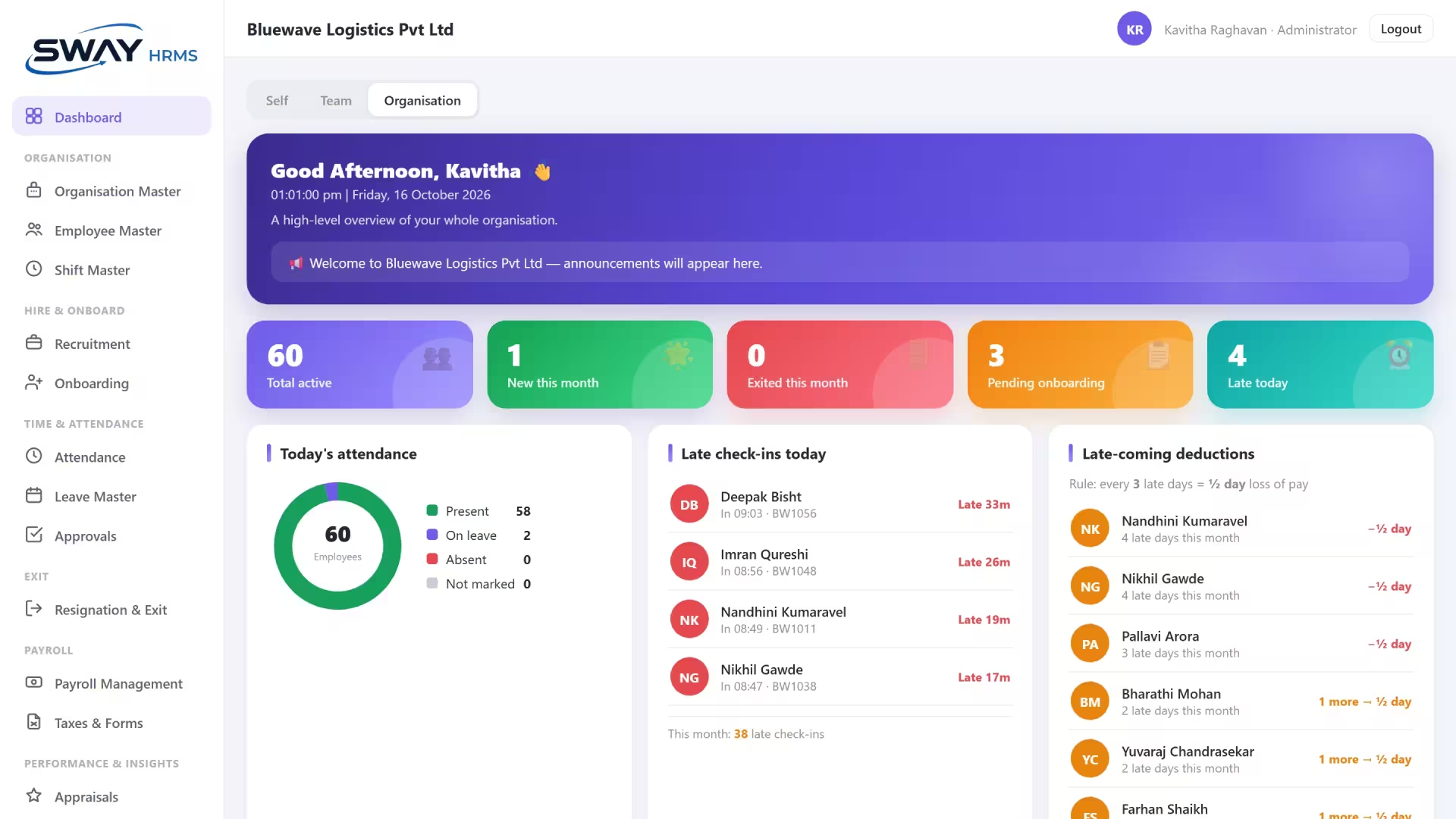
One secure workspace for the whole employee lifecycle.
In most growing companies, HR lives in a register, an attendance machine, a WhatsApp group and an Excel sheet that someone rebuilds every month for payroll. Leave balances are guessed, late arrivals are argued about, and nobody is sure whether PF and ESI were worked out the same way as last month. SWAY HRMS puts all of it in one application. A candidate moves from opening to interview to hired, and an onboarding checklist turns them into an employee with a code. Employees check in from their phone, take leave against real balances and see their own payslips. At month end, payroll reads attendance, leave and late arrivals directly, works out PF, ESI, PT and TDS, and produces payslips the employee can open on their phone once HR finalises them.
Pay people correctly
Attendance and time
Leave and approvals
People and organisation
Hire to exit
Dashboards and reports
The employee's phone
Part of the SWAY family
Built for Indian payroll
Every payslip works out PF at 12% of basic (capped at the ₹15,000 wage ceiling), ESI at 0.75% and 3.25% when gross pay is ₹21,000 or below, professional tax and TDS, with employer and employee shares shown separately. Loss of pay comes straight from attendance, so absences and half-days are never keyed in twice.
- PF at 12% of basic
- ESI at 0.75% and 3.25%
- PT and TDS
- Loss of pay from attendance
Pay people correctly
Every payslip works out PF at 12% of basic (capped at the ₹15,000 wage ceiling), ESI at 0.75% and 3.25% when gross pay is ₹21,000 or below, professional tax and TDS, with employer and employee shares shown separately. Loss of pay comes straight from attendance, so absences and half-days are never keyed in twice.
- PF at 12% of basic
- ESI at 0.75% and 3.25%
- PT and TDS
- Loss of pay from attendance
Salary structures per employee, a monthly run that produces every payslip, then review and finalise. A finalised month never changes, even if a rule changes later. Export the run to Excel with bank details for the salary transfer.
- Review and finalise
- Finalised means final
- Bank export to Excel
Set up PF and ESI rates and ceilings, professional tax, TAN and your PF and ESI establishment codes once. A contributions view adds up PF, ESI, PT and TDS from finalised payroll for each month, ready for filing.
- Set up once
- Monthly contributions
- Ready for filing
Attendance and time
Employees check in and out from the app with their location and a selfie as proof. They can check in more than once a day, for lunch or a field visit, and HR sees every session with the photo and a map link.
- Location and selfie
- Multiple sessions a day
- Photo and map link
Define shifts with start and end times, a grace period and weekly offs, and keep the company holiday list. Check-in closes on holidays and week-offs, so nobody marks attendance on a day off by mistake.
- Grace period
- Weekly offs
- Holiday list
Lateness is measured against each person's shift start after the grace period. Switch on a rule such as "every 3 late days = half a day's pay" and it flows into payroll. The employee sees their late days and any deduction building up before the payslip arrives.
- Against each person's shift
- Flows into payroll
- Visible to the employee
Daily and monthly views, single and bulk marking, and a month summary with present, absent, leave, late days and late deductions for every employee.
- Daily and monthly
- Bulk marking
- Month summary
Leave and approvals
Leave types and yearly balances per employee. Employees apply from the app, and managers approve or reject. An approval takes the days off the balance and marks them on the attendance sheet.
- Yearly balances
- Apply from the app
- Marks the attendance sheet
Pending leave requests and resignations come together in one inbox, so a manager or HR clears everything waiting on them from one screen.
- Leave requests
- Resignations
- One screen
People and organisation
One record per employee: department, designation, reporting manager, shift, bank account, PAN and UAN, date of birth and joining. An employee can be given their own sign-in from the same screen.
- PAN and UAN
- Bank account
- Sign-in from the record
Company profile, departments and designations, and seven roles: Admin, HR, MD, General Manager, Team Head, Manager and Employee. Each person sees only what their role allows.
- Departments and designations
- Seven roles
Hire to exit
Job openings, candidates moving from applied through screening, interview and offer to hired, and interview rounds with the interviewer, feedback and a pass or fail result.
- Applied to hired
- Interview rounds
- Feedback and result
A checklist for every new joiner. When the tasks are done, one step converts the joiner into an employee with the next employee code.
- Joiner checklist
- Next employee code
Run review cycles for the whole company at once. Each employee writes a self review, their manager adds a rating and comments, and HR closes the cycle.
- Self review
- Manager rating
- Company-wide cycles
Record a resignation and the last working day is worked out from the notice period. Once it is approved, an exit checklist follows, and completing it marks the employee as exited and closes their sign-in.
- Notice period
- Exit checklist
- Sign-in closed
Dashboards and reports
An Organisation view for owners and HR, a Team view for managers and a Self view for each person: today's attendance, late check-ins, leave use, headcount by department, upcoming holidays, birthdays and work anniversaries.
- Organisation
- Team
- Self
Headcount, attendance (with late days and deductions), leave and payroll cost reports for any month.
- Headcount
- Attendance
- Leave
- Payroll cost
The employee's phone
Employees get a phone app with Home, Attendance, Leave, Pay and Me tabs: a live clock with the check-in button, their month's attendance, leave balances, payslips to view and print, and their work schedule and rules.
- Live check-in clock
- Leave balances
- Payslips to view and print
Install SWAY HRMS from the browser on a phone or desktop and open it like any other app. There's no app store download and no client software to maintain.
- Installs from the browser
- No app store
Part of the SWAY family
Bring ERP staff in as employees in one step. When payroll is finalised, the salary journal (salaries, PF, ESI, PT and TDS payable) posts itself into SWAY ERP's books.
- With SWAY ERP
- Staff in one step
- Salary journal posts itself
Bring drivers in as employees. Days a driver spends on a trip are marked present automatically, and the payslip notes the trips and batta from SWAY TMS.
- With SWAY TMS
- Trip days marked present
- Trips and batta on the payslip
Every company's records live in their own database, which is backed up every night. One password works across the SWAY products a company uses, and a password reset or a suspended account ends existing sign-ins straight away.
- Own database
- Nightly backup
- One password across SWAY
Built for Companies That Want
HR Done Properly
SWAY HRMS is HR and payroll software built in India for growing companies. Teams use it to take every employee from job opening and onboarding through attendance, leave, shifts and appraisals to payroll and exit. Employees check in from their phone with location and selfie, and payroll reads attendance, leave and late-coming directly to work out PF, ESI, PT and TDS on every payslip. It runs on its own or alongside SWAY ERP and SWAY TMS, in one secure application.

From setup to payslip, in four steps.
Every month is set up, run, paid and closed in one workspace.
- 01
Set up your company
Add departments, designations, shifts, holidays, leave types and your PF, ESI and PT details. Then add your employees, or bring them in from SWAY ERP or SWAY TMS.
- 02
Give everyone the app
Each employee signs in at your company address and installs the app on their phone. They check in, apply for leave and see their own balances.
- 03
Run the month
Managers approve leave from the approvals inbox. Attendance, late arrivals and leave build up on their own as the month goes on.
- 04
Run payroll and pay
Run payroll, check the payslips and finalise. Employees see their payslip on their phone, you export the bank list, and with SWAY ERP the salary journal posts to the books.
TRUSTED BY LEADING LOGISTICS COMPANIES



















Why teams choose it
Payroll reads the attendance sheet.
Absences, half-days, approved leave and late-coming rules go into pay automatically, so nobody rebuilds the month in Excel.
- Absences and half-days
- Approved leave
- Late-coming rules
Proof, not arguments.
Each check-in carries the time, the location and a selfie, measured against the person's own shift.
- Time
- Location
- Selfie
Rules everyone can see.
Employees see their late days, leave balances and any deduction as it builds up, before the payslip arrives.
- Late days
- Leave balances
- Deductions
Finalised means final.
A finalised payroll month is never rewritten, even when a shift or a rule changes later.
- Locked months
HR gets fewer questions.
Balances, payslips and attendance are on the employee's phone, so routine requests stop.
- Balances
- Payslips
- Attendance
Part of the SWAY family.
Use it on its own, or link it to SWAY ERP and SWAY TMS with the same password.
- Standalone
- SWAY ERP
- SWAY TMS
What you need to get started
A modern browser
Chrome, Edge or Firefox on a desktop or phone. Employees can install SWAY HRMS as an app on their phone.
- Chrome
- Edge
- Firefox
Your company address
Each company gets its own sign-in address, e.g. yourcompany.eroyal.ai, or yourcompany.eroyal.ai/hr if you also use another SWAY product. Employees use the same address.
- yourcompany.eroyal.ai
- /hr alongside other SWAY products
User accounts
Created by your administrator, each with a role. Employees can be given a sign-in from the Employee Master.
- Role-based
- From the Employee Master
Location and camera (optional)
Check-in asks for the phone's location and camera for proof. If an employee refuses, they can still check in without them.
- Optional
- Proof of check-in
SWAY ERP or SWAY TMS (optional)
Only needed for the staff, driver and payroll-journal links. Your Royal Tech contact switches them on.
- Optional
- Switched on by Royal Tech
Ready to Run HR and Payroll from One Place?
HR and payroll built in India: hiring to payslip, with a phone app for every employee.